

A mac dashboard widget to view one or more logfiles continuously – not in active development
Features
- View one or more logfiles á la “tail -f /var/log/system.log”
- Font and size can be changed
- Different themes, variable opacity
- Check if the given logfile is accessible
- View remote files (via http)
Screenshot
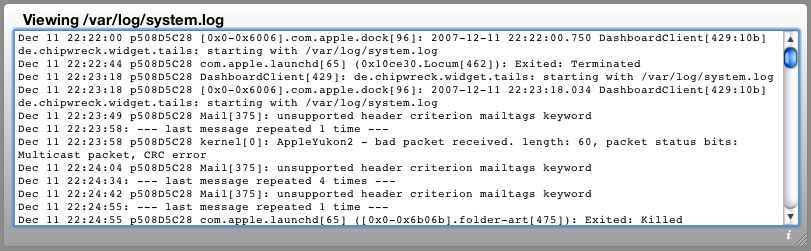
Download
Requirements
- Mac OS X 10.5+
Installation
- If you’re using Safari, click the download link. When the widget download is complete, Show Dashboard, click the Plus sign to display the Widget Bar and click the widget’s icon in the Widget Bar to open it.
- If you’re using a browser other than Safari, click the download link. When the widget download is complete, unarchive it and place it in /Library/Widgets/ in your home folder. Show Dashboard, click the Plus sign to display the Widget Bar and click the widget’s icon in the Widget Bar to open it.
How to use
- Enter at least one logfile to be watched – the complete path is needed, for example: /var/log/system.log
- Enter multiple logfiles separated by spaces.
- If the logfiles are outlined in red: One of the files is not accessible – either the path is wrong or you are not allowed to view it.
- To view a remote logfile (must be accessible via http) enter its URL – like http://server.name/log.php (This function is beta)
Changelog
1.3
View a remote logfile via http (beta)
1.2
Allow larger font-sizes
1.11
Snow Leopard update
Compressed JS code
1.10
Viewing multiple logfiles now possible
UI cleanup
New icon
Set number of lines to show initially
Bugfixes and improvements
0.94
Resizable in both dimensions
Layout improved
0.93
Small improvements
Font can be changed
Themes impelemented
Variable opacity
0.92
Bugfix for OS X 10.4 (Tiger) – should resize correctly now
0.9
Fontsize can be changed
Check if given logfile is accessible
0.8
Initial release
Congratulations! Very good software.
Not possible to have multiple files on each widget window.. Any progress on that?
Hi –
thanks! Well, the last update is 5 years ago and I’m surprised the widget still works ;) You can enter multiple files separated by space, but I assume you mean having several widget instances with different configurations?
I’m not sure if I’m going to continue developing the widget, but if not I can of course publish the source code. And since it’s HTML, CSS and JavaScript it won’t be too hard to fix some issues I hope.
Best,
Mario
how do i use syslogviewer to read a remote log?
I have a router log that needs to be monitored.
With syslogviewer only that’s not possible – the widget only has the possibility to read local files. Reading remote files would be possible, but only if those files are accessible via http – which usually isn’t the case (in most cases you need ssh or a similar auth mechanism).
Here’s a way how to access files via ssh on the console: http://hints.macworld.com/article.php?story=20060707143735901 – the resulting file (“remote-httpd.log” in this example) could then be viewed with syslogviewer. In order to do this you of course have to start this command on every login. The best way to access remote logs depends on your router of course.
i have the file accessible via http
http://X.X.X.X/user/log.html
Okay, I’ll have a look the next days how to integrate http-access in the widget. I think it should be possible, but to be sure I have to try it out.
Okay – in version 1.3 you can now view a single remote logfile by entering the URL (must start with http).
This works via curl and is of course still very beta. The curl connection has a timeout and is being reloaded, so it *should* work with files that update continuously on the server.
Please note: The remote logfile should be text-only – html is not being rendered (and that would be very difficult).
Hmm. Not refreshing?
Installed with default settings on Snow Leopard, initially saw /var/log/system.log, but i never see it scroll/refresh. Only thing I can think is it is a result of my having hit ENTER a few times at the bottom of the log in the widget to make a good visual gap before next entry (which never came).
Any idea what’s going on?
-Bronius
Just tried out what happens if you type in something: In this case the refreshing stops.. I had to remove the widget (alt + close button) and to add it again in order to make it work again – so this should help. Otherwise tell me..
BTW: The visual gap would be a good idea, but since the widget uses unix-tail it wouldn’t be very easy to realize. Maybe if I’ve got too much time :)
Ah, I just returned here to edit my post :) Indeed, removing and re-adding the widget does get it back to refreshing again.
A visual gap, a line, anything would be helpful. I don’t know how you’ve built this, but it sounds like the whole textarea is refreshing. In this case, perhaps a go-between is to merely append lines (and possibly pop the top): This way, if some joker like me comes along to hit ENTER in the middle of a refresh, it will simply slap on a new line. That’s the behavior I expected, just like I currently do with tail -f at cli.
But the price is right! ;) Cheers.
Hi Mario,
is it possible to view the syslog from a ubuntu server in the LAN? What would be the command?
Thanks and greets
Knigge
Hi –
yes that should possible by configuring syslog to receive remote logentries via UDP. And there are also a bunch of other remote logging tools, so it depends on your needs and on your special configuration.
Have a look at this page:
http://www.debuntu.org/how-to-remote-syslog-logging-debian-and-ubuntu
All right, thanks a lot ;)
Loved it …. Makes life bit easier…. plus I like its simplicity. Thanks for the tool
very usefull !
Thanks a lot
When I enter three logs separated by spaces, the logs are outlined in red and no logs are shown.
Hi –
that means one of the logfiles is not present or accessible (either you mistyped the path or included a logfile you can’t view – for example /var/log/secure.log). Simply try with one logfile and check if that works and then with the next..