
A scientific calculator as Eclipse-plugin – not in active development.
Current version: 1.1
Features
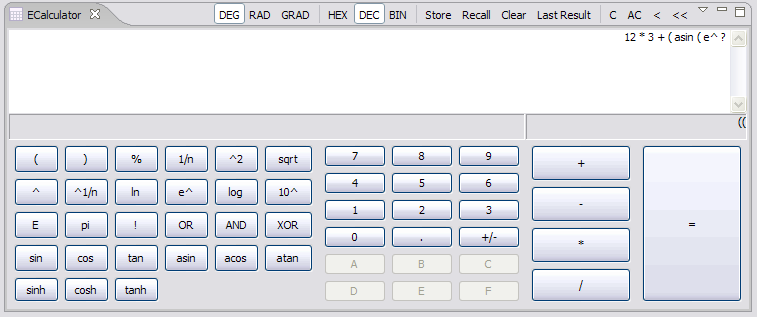
- Integrated into the eclipse workbench
- Standard, scientific and trigonometric calculation
- Display of the calculation in base-n numbers (decimal, hexadecimal, binary)
- Uses arbitrary precision where applicable
- Memory function for a number and the last calculated result
- Enter arithmetic expressions naturally
- (NEW) Copy and clear as customizable shortcut
- (NEW) Use comma to enter decimal point (for German keypad i.e.)
Screenshot
Requirements
- Windows | Linux | OS X
- JDK 5.0
- Eclipse 3.1+ eclipse.org »
Installation via update-manager (recommended)
- In Eclipse: Select Help » Software Updates » Find and install…
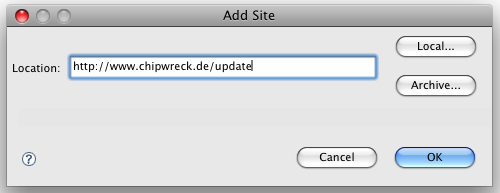
- Search for new features to install » Next » New Remote Site…
- Enter a name (“ecalculator”) and this URL: http://www.chipwreck.de/update
- Click “Finish..” and select the appropriate feature
Installation via download
- Download the package: ecalculator-1.1.zip »
- Quit Eclipse if running
- Open the zip-file and copy the contents of the “features” and “plugins” directory into your Eclipse folder
- Start Eclipse
Usage
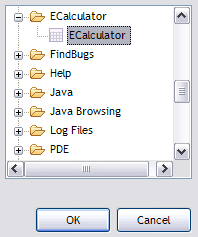
- After installing and restarting Eclipse, choose: Window » Show View » Ecalculator » Ecalculator
- If the category doesn’t appear, check if you installed correctly and restart Eclipse using the “-clean” option
- Make sure you use JDK 1.5 or higher
Sourcecode
Download ecalculator-src-files.zip
Changelog
1.1
Use comma key to enter decimal pointKeyboard shortcuts configurable for copy, clear, clear all
Small bugfixes
1.0.5
Updated (and included :) the helpRecompiled for 3.3
Small bugfixes
1.0.4
Small bugfixes1.0.3
Hexadecimal and binary modeSmall improvments in the GUI
The buttons in the title bar don’t work when install in Neon Eclipse.
I really miss the hex and binary modes.
Richard
Well the last update was 5 years ago, so I’m surprised it still works anyway ;) I don’t think I’ll find time to update the plugin soon, but the source code is available.
Are there any solution to fix the problem with the options? I usually worked with this plugin, and it would be really interesting for me…
FGS.
Hi, currently I don’t have any plans (and neither the time) to continue development, but the source code is available.
Would love to have a toggle to make an easy calc if i didn’t need the additional functions.
Please also add a simple calc.
even if I put the calc into a small window, some default options like, clear, C, AC are not reachable anymore.
See here:
http://i.imgur.com/USmHKOg.png
Hi –
good idea but I’m sorry – the next weeks I won’t have time to update any of my projects here (stuff to do, moving, job etc..), so if someone wants to have a look at the sourcecode and modify it – no problem. Maybe later I’ll find some time and will have a look.
Well, looks great but there is still no source code… Is it open source, repo at sf is empty. Could you please inform me/us? Good work, use your calculator offen.
I simply forgot to update the sourcecode repo.. :)
You can find the current sourcecode here: download ecalculator-src-files.zip ».
Hello!
A great Tool.
Could it be possible that the calculator works with the “,” also for european format.
If the “,” on the num-block is pressed nothing happens.
Hi – yes that’s a good point. I never thought of this since every language I work with in Eclipse needs the decimal point. But for other purposes the European comma would be a good idea.
I assume you mean that the display also shows the comma, right?
One thing though: It might take some time until I’m having enough spare time to work on Ecalculator – the customizable keyboard shortcuts (see comment below) are then also on my list.
(UPDATE) Check the latest version..
Hi,
First of all: Thank you for the great plug-in! It’s a real time saver if you have calculate lots of em’s…
But I have a few wishes:
Could you please add shortcuts for C and AC, and maybe add a “Copy Result/Expression to Clipboard” and “Delete last Digit/Sign” (in the Eclipse Key Options)?
I’m a fan of shortcuts and don’t use the mouse often in Eclipse, this could imho save even more time :)
Thanks,
Markus
Hi –
nice to hear that! Well I didn’t update the plugin a longer time ago, so it should be about time. And I’ll try to incorporate your ideas, so maybe in the next two weeks it’ll be updated.
But one thing should already work: Copy to clipboard is integrated (via ctrl-c or cmd-c, depending on your platform).
(UPDATE) Check the latest version..
Hi,
thank you very much for the update!
The keys are working perfectly and the “,” functionality is also great!
Yours,
Markus
Hello,
Very great plug-in. It’s possible to get the source code ?
Best regard
Laurent
Hi –
nice to hear that!
The source code of a previous version is available at sourceforge, but I’ll post the current version source here, tomorrow or so.
See above :)