
- Download / Feedback •
- Help •
- Coda Tips
Requirements • Installation • Troubleshooting/FAQ • Usage • Credits/License • Changelog
Requirements
- Coda 1.6.12 (or higher) from panic.com »
- OS X 10.6 (or higher)
Installation
- Download, unzip and doubleclick the Coda-plugin file. Restart Coda if necessary.
- Make sure you use the latest version:
UseCheck for Updates
in the menu or enable automatic checking for updates in the Preferences.
Coda plugins are installed in ~/Library/Application Support/Coda/Plug-ins/ (Coda 1)
or ~/Library/Application Support/Coda 2/Plug-ins/ (Coda 2)
Problems? Try this:
1. Did you restart Coda after updating?
Please try this first.
2. Make sure you use the latest version.
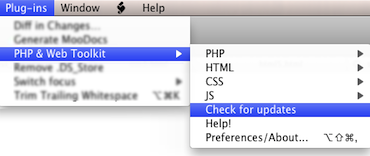
Use Check for updates
in the Plug-ins menu:
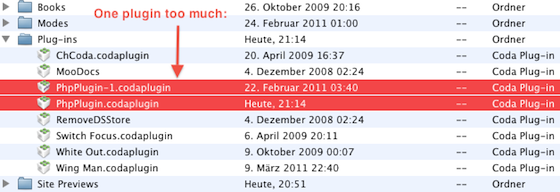
3. Have you accidentally installed this plugin more than once?
Go to the plugin-folder:
(your user folder)/Library/Application Support/Coda/Plug-Ins/ – for Coda 1
(your user folder)/Library/Application Support/Coda 2/Plug-Ins/ – for Coda 2
If it looks like below: delete the PhpPlugin-files, download, install again.
4. Check the FAQ »
Thanks.
5. Read the Documentation »
6. If that doesn’t help, don’t hesitate to submit a comment »
Also helpful: Switch the debug mode on and have a look at the console output.
FAQ
- How to submit bugs/comments?
-
Simply post a comment here ».
- Can’t install: The plug-in
PhpPlugin
could not be read. Please verify the plug-in’s format or try re-downloading the plug-in from the author’s website. The “.codaplugin”-extension is linked to the “Coda Plug-in Creator”, to fix:
Right-click on the “PhpPlugin.codaplugin”-file and choose “Open with…” and select “Coda” (instead of the default entry “Coda Plug-In Creator”).
(You can also use the information window CMD+I to change the association of .codaplugin-files permanently)- Coda 2: Folded Code is not validated/deleted
-
This is a bug in Coda 2.0 and will be fixed in the next Coda update. In between unfold the code before.
- I get one of these errors:
File encoding does not match
,Undefined response received, please report this error
,Error – No output received in replaceEditorTextWith
,Errors Parsing –
,LessCSS is incompatible
, an exception while using proCSSor -
Fixed now – update to the latest version.
If you use the LessCSS-plugin: Simply uninstall it – it’s incomaptible – and use the much better Less.app » instead.
If you use Mojo WebOS-plugin: Also outdated, so uninstall it (or contact its author) - I use OS X 10.4 (Tiger) and Coda/the plugin crashes
-
Yes, the requirement is OS X 10.6+, so an update of OS X would be the easy solution.
- I’m trying to use PHPtidy on a selected part of the editor – doesn’t work
-
It works if you include the opening and closing PHP-Tags in the selection: <?php .. ?>
- Tidy HTML is nice, but afterwards my PHP code is broken?!
-
If you use short PHP-tags inside attributes like this:
a href="<?=getLinkTarget() ?>"Tidy
cleans
it, in this case use complete php-tags for the attribute value in single quotes:a href='<?php echo getLinkTarget(); ?>'Or use can use TidyPHP , and have a look at the output – undo is your friend :).
- How to remove/uninstall the plugin?
-
Close Coda, go to (your_home_folder)/Library/Application Support/Coda/Plug-ins/ and delete the file PhpPlugin.codaplugin – that’s it.
(For Coda 2 the path is (your_home_folder)/Library/Application Support/Coda 2/Plug-ins/)
- After executing some function something has gone awfully wrong/I get an exception, why?
-
Please enable debug messages in the preferences and post a comment here ».
Note: There’s always Undo (Cmd-z) to get back the previous file content.
- What’s the difference between the validation functions?
-
Validate HTML online
uses the W3C-Service (suprise..),Validate HTML
uses Tidy (tidy.sourceforge.net). Both generally do the same, but tidy reports for example useless empty tags – which are according to the W3C standard of course valid. - This plugin has helped me/saved my life/I’d like to support the development – now what?
Cool – just post a comment, visit the ads or donate some dollars/euros via paypal (see the pink box on the right side).
- Why did you not include feature XY?11!!1??
-
Two reasons – first: I’ve started this for my private entertainment and work on it in my spare time. So things might take longer.
Second point: I can only use the functions provided by Panic via the Coda API – and some things are simply not (yet) there, like Get URL from Browser Preview and so on…
Usage
- In the Menu, select “Plugins” and then “PHP & Web Toolkit”.
- All functions are applied to the file currently opened in the editor.
- Note: You can undo all changes with cmd+z
Preferences
- Check for Updates
Automatically check for a new version once a day. Recommended!
- Use selection
If you have selected a part of the file, functions will be applied only to this part.
- Notify via Growl
Growl is a OS X notification tool. If you have installed Growl you can enable this to get some notifications via Growl.
- Results in floating window
The result of functions like HTML/Javascript/CSS validation is shown in a floating window instead of a new Coda Tab. Recommended!
- Beep Only
If enabled, successful PHP validation is indicated only by a sound (otherwise a sheet appears).
- Auto Save
If you enable this, the PHP validation automatically saves the file – if no errors occured.
- PHP Tidy
Configure braces style, if blank lines are added, if whitespaces are being inserted and if comma spacing is being fixed.
- Online Validation
Choose which online validation service you’d like to use.
- HTML tidy – Configuration
Select the format in which HTML tidy outputs your file – simply try out what works best for you. If you choose “Custom” you can modify the configuration manually, the button at the bottom takes you to the online documentation.
Note: “Body only” works well with HTML snippets, but removes DOCTYPE and header (if present).
- CSS tidy
Select the format in which CSS tidy outputs your file – low compression means: Very readable with newlines and spaces, higher compression: Less space used, but also less readable. Simply try out what works best for you.
- CSS level
Choose which CSS level will be used for the online validation (CSS 2, CSS 2.1, CSS 3).
- JS Tidy
Configure how JS Tidy should format your javascript code.
- JS Hint
Configure the details of JS Hint javascript validation.
- Debug Mode
Use this to view debug information in the console (and send these to me if you encounter problems).
- PHP executable
If you want to use another php version than the one that come with OS X, you can set the file location here.
- Online Validation
Here you can change the URL and the fieldnames for online validation, use this if a web service has changed its address.
Validate PHP – Check PHP file for syntax errors
If an error occurs, choose “Go to line” and the cursor will be moved to the appropriate line:

If you enable “Auto save” in the preferences (and no errors occured), the file will be saved automtically.
Note for Coda 1: If the line is out of focus, it’s not automatically scrolled – this is a drawback of the Coda 1 API.
Tidy PHP – Clean up and reformat PHP code
This sends the file to PHPtidy, which cleans it up and reformats PHP Code — Use this for PHP files which are unreadable or chaotic.
Validate HTML – Check HTML files for Validity
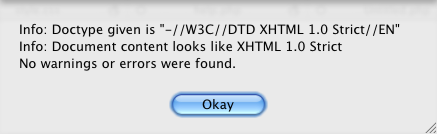
If the file is valid, you see an information window like this:
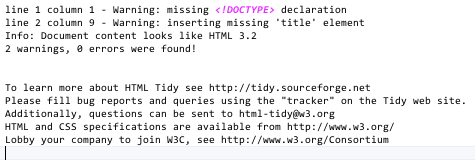
If there are errors, a new window opens – listing the problems HTML tidy found:
Validate HTML/CSS online – Online validation of HTML/CSS source code
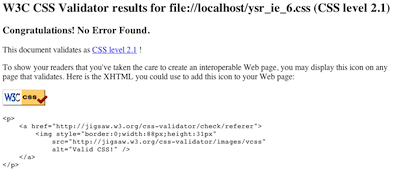
The current file (=its source code) is sent to the w3c-validation service for HTML- or CSS-files. The result is shown in a new window. You have to be online of course.
The output is missing some images, but nevertheless you can see what’s wrong or not.
Tidy HTML – Reformat HTML
Use this to reformat HTML-code.
Note: The format can be specified (in 5 variants) in the Preferences.
Tidy CSS – Reformat CSS-files (via CSS Tidy)
Use this to reformat or minify CSS-code.
Note: The format can be specified (in 4 variants) in the Preferences.
Strip Whitespace and Comments – Removes all comments and whitespaces from PHP
Useful to save space or to clean up a file you won’t be editing further.
JS Hint – Check and validate Javascript files
This checks the currently open javascript for errors and problems. If problems are found, a new window opens with a detailed report. More information about JSHint can be found on the JSHint homepage ».
Minify Javascript/CSS – Shorten JS/CSS files
This minifies (compresses) the currently open javascript/css file. It removes comments and unnecessary whitespace from javascript/css files, resulting in faster downloads. More information can be found on the JSMin homepage ».
Tidy Javascript – Reformat Javascript files
This reformates (beautifies) the currently open javascript file. Use this to get a readable version of minified files for example or to clean up chaotic code.
Credits
Using the following great tools: phptidy (cmr.cx/phptidy), HTML tidy (tidy.sourceforge.net), CSS Tidy (csstidy.sourceforge.net), JSHint (jshint.com), JSMin (github.com/rgrove/jsmin-php) and JSBeautifier (jsbeautifier.org).
License
This software is copyright Mario Fischer 2008-2014. It is free for personal and business use, redistribution only without modifications. Donations are welcome.
This software is provided ‘as is’. In no event shall chipwreck.de be liable for any direct, indirect, incidental, special, exemplary, or consequential damages (including, but not limited to, procurement of substitute goods or services; loss of use, data, or profits; or business interruption) however caused and on any theory of liability, whether in contract, strict liability, or tort (including negligence or otherwise) arising in any way out of the use of this software, even if advised of the possibility of such damage.
Changelog
4.2
JSHint 2.3.0 included Removed some legacy options from JSHint configuration Use any JSHint option, there’s a text field in which you can enter JSHint config options. (separated by comma). A list of valid options can be found here: jshint.com/docs/options/ Rewritten JSHint-Wrapper (because JSHint works a bit differently now) Removed some legacy JSHint options
4.1
Bugfix for a very improbable exception Code update (mostly internal stuff) Dialog layout improved when resized
4.0
CSSTidy updated to the current development release. This should now correctly format CSS inside @media-tags. Integrated HTML 5 compatible tidy for validation and reformatting
3.9
New: Validate JS on save (Coda 2 only)
New: Separate CSS minification included
Fix PHP validation on save with selection
Laxcomma setting for JSHINT
JSMinify updated
3.8
Lots of bugfixes
Compatibility with other plugins improved
JSMinify updated
3.7
New: Minify on Publish (Coda 2 only)
New: Modify file extension list for PHP validate on save
Check if Growl is present, includes Growl 1.2 and Growl 1.3 notifier
CSSTidy: New option Remove last ; – control if the last ; in a block is removed or not
CSSTidy: Workaround for wrong @import behavior
JSHint: Doesn’t report useless strict warnings anymore
JSHint: Removed unused –safe option
JSHint: Added link to option documentation in the preferences
CSSTidy/JSMinify: CR/LF handling improved
PHPTidy won’t try to format php files with syntax errors
Rewritten launching of php based tools, more robust now
Refactoring PHP error display
Performance/memory improvements
Preferences layout improved, added Google+ link
3.6
“Unified” version for Coda 1 and Coda 2
Checks automatically if accidentally more than one plugin is installed
New function: PHP validate on save (Coda 2 only)
Javascript JSHint: Updated to a new version
Javascript Tidy (JSBeautify): Update to latest version, no file size limit anymore, CR/LF handling correctly now
CSS Tidy: Update to latest version, CR/LF handling correctly now
Performance improvements (loading time, js functions)
New version notification now shows the new version number…
Plugin path is now correct for Coda 1 and Coda 2
3.5 beta
Coda 2 compatible version
New preference setting for JSHint: Use smart tabs
“Go to line” (for PHP errors) now uses the API function in Coda 2, so it scrolls to the error location
Automatic update should now work correctly with Coda 1 and Coda 2
3.4
Remove proCSSor because the API service has been cancelled
3.3
Small bugfix for Prefs window layout
Internal structure improvement
Fix (improbable) memory leak
3.2
Validate PHP syntax before performing PHPtidy
Minify CSS
Updated CSSTidy
Preferences window improved (links to twitter/fb/donate)
JS Hint: Many more options
JS Hint: Respect line endings, whitespace warnings now correct
JS Tidy: Respect line endings
3.1
JS Tidy now also configurable
proCSSor bugfix
Respect Tabs/Spaces where available
Automatic Update (finally..!!)
Improved validation results
JS Hint updated
PHPTidy improvements
JS Hint: Remove (quite useless) “unsafe character” warning
Result window looks cooler now
Modularized the code
Modularized the code
Prefs window improved
3.0
Use selection
Growl (and growl-like) notifications
Results as floating window
More preferences for PHPTidy
HTML online validation: Included three validator settings
Drop curl, use cocoa instead
Use JSC call instead of shell script
JShint preferences
Improved preferences layout
Bugfixes, lots of
Nearly complete code rewrite
2.7
Show an short message after updating (only once)
Updated CSSTidy to 1.3.1
HTML Validate output improved
HTML5 support
aka workaround for tidy
JSLint replace by JSHint (upgrade, kind of)
Preference for PHPTidy: Fix statement brackets
2.6
Preferences for PHPTidy: New lines, Whitespaces, Comma spacing
Bugfix for umlaut conversion with JSTidy
2.5
Set CSS Level for validation (2, 2.1, 3)
Configure PHPTidy braces placement
2.4
Warning message (incompatible plugin) improved
Before accessing proCSSor, check if incompatible plugin present
2.3
TidyCSS update (current SVN)
W3C online response much more readable
Check for incompatible SBJsonParser
Error messages improved
Updatecheck circumvents cache now
2.2
New: Beep only for PHP validation
Preferences window now remembers the open tab
Preferences window revamped (again..)
Shortcuts also shown in the preferences
HTML Tidy version in about window now modified if “use internal” is changed
Improved some tooltips in the preferences
2.1
New: procssor.com configurable
New: JSBeautifier included
About window now part of the preferences
Preferences window revamped
Code clean-up
Shortcut for JS Beautifier
2.0
New: Encoding automatically selected
New: Custom HTML tidy configuration
New: Included a more recent HTML tidy binary
New: procssor.com online service included (experimental)
Goto line now works correctly with different line endings
Line endings now respected in HTML tidy, CSS tidy and PHP tidy
HTML tidy version shown in the about page
Preferences window new layout
JS lint now correctly handles backslashes
Error messages improved
Message sheet layout improved
1.9
New: JS Minify
HTML Validation report window now can be close without the annoying “Save Changes”-question
“Reveal in Finder” bugfix at preferences page
Donation button in the about window (Hint: click it :)
1.81
CSS tidy now handles CSS3 values starting with a dash (-)
Keyboard shortcuts for CSS tidy and Preferences
Some code clean-up
1.8
Javascript Lint (JSLint) now included
Update check now daily instead of each time Coda starts
New CSS tidy configuration: Sort attributes
1.7
HTML tidy now configurable (in the Preferences) !
Preferences are automatically saved
Bugfix when saving Coda Prefs
1.62
Automatic update check now in the background (asynchronous)
CSS tidy now configurable (in the Preferences) !
Less intrusive error-messages on connection failures
1.6
User Preferences
Automatic check for updates
CSS tidy integrated
Structured Menu (aka Submenus)
Using the HTML-tidy version delivered with OSX (PowerPC compatible)
Redesigned the error- and “validation okay”-sheets XCode-like
More encodings: ASCII, UTF-16, Windows CP-1252
All functions use the current buffer contents now
Error messages not explicitely state their origin
Updated phptidy to current version 2.10
1.4
W3C-Validation online for HTML-files
W3C-Validation online for CSS-files
Help button (on the about sheet) now opens this page
1.31
W3C-Validation service, 1st try
1.3
Improved Sheet display
Bugfixes
1.13
Validate HTML (via tidy)
Jump to error line – if PHP validation finds an error
Check for Updates (in the about-box)
File encoding can be chosen
Nice sheets, no more of those ugly alert-boxes
Menu items are only available if they should be
Lots of code cleanup
More useful “About”-dialogue, link to the plugin homepage
0.96
“About..”-dialog
Improved exception handling
Bugfixes
0.9
New features: HTML tidy, Strip PHP, PHP tidy
Included HTML Tidy
Included phptidy
Bugfixes
0.85
Bugfixes, dialogs updated
0.8
Initial release